Primer Blog
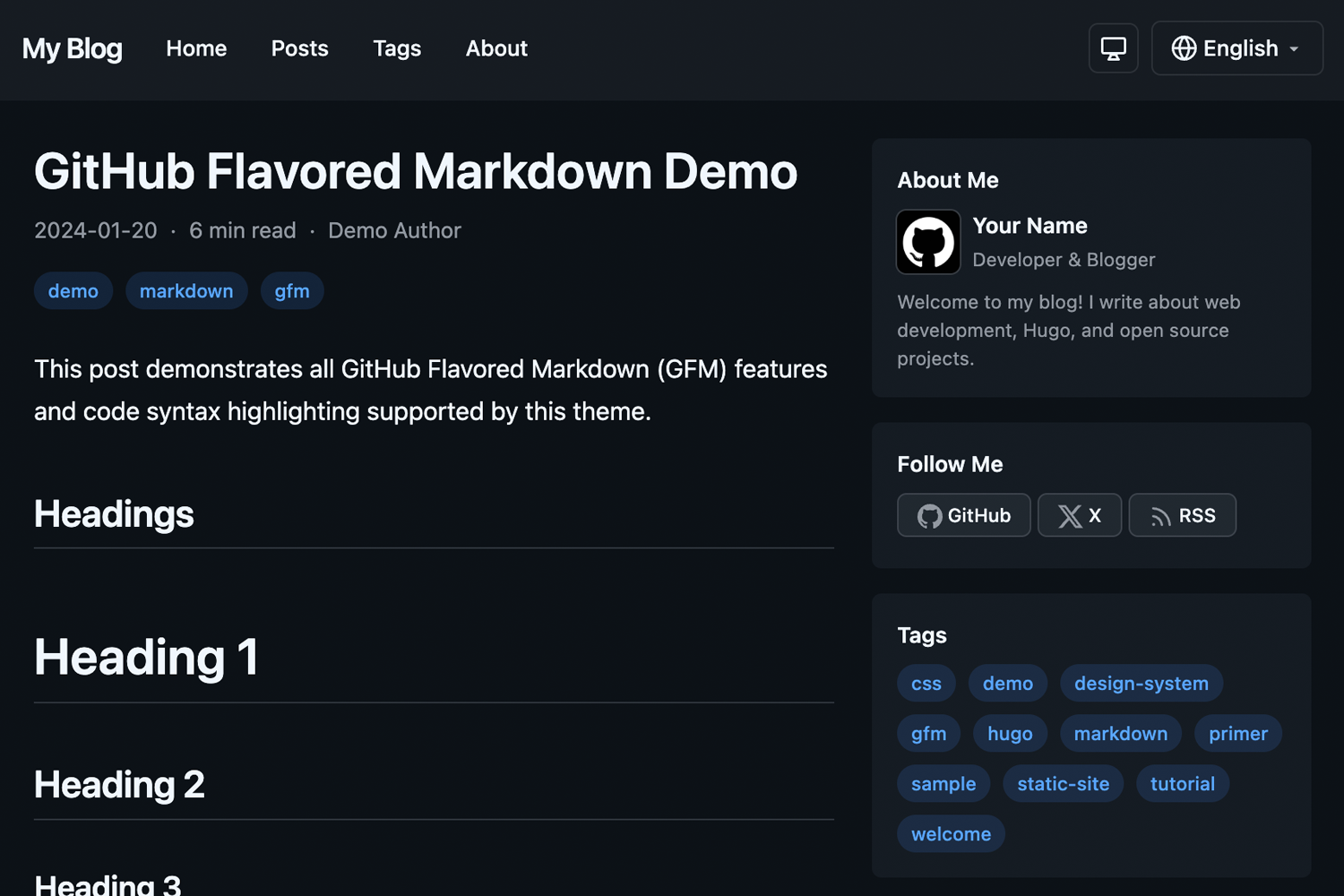
A clean, responsive Hugo blog theme using GitHub’s Primer CSS design system.
Features
- Dark Mode - Automatic system preference detection with manual override, saved to localStorage
- Multilingual - Full i18n support with included English and Japanese translations
- Responsive Design - Looks great on all devices with optional sidebar layout
- Primer CSS - Built on GitHub’s design system for a clean, modern look
- Customizable Primary Color - Easy accent color customization via config
- Markdown Styling - Full Primer markdown styling for rich content
- Hugo Pipes - Built with Hugo Pipes for optimized asset handling
Requirements
- Hugo v0.146.0 or later (Extended version not required)
- Node.js and npm (for Primer CSS dependencies during theme development)
Installation
As a Hugo Module (Recommended)
- Initialize your Hugo site as a module:
hugo mod init github.com/your-username/your-site
- Add the theme to your
hugo.toml:
[module]
  [[module.imports]]
    path = "go.ngs.io/hugo-primer-blog"
Note: This theme uses a vanity import path. The module is hosted at go.ngs.io/hugo-primer-blog and resolves to the GitHub repository.
As a Git Submodule
- Add the theme as a submodule:
git submodule add https://github.com/ngs/hugo-primer-blog.git themes/hugo-primer-blog
- Install npm dependencies:
cd themes/hugo-primer-blog
npm install
- Set the theme in your
hugo.toml:
theme = "hugo-primer-blog"
Configuration
Basic Configuration
baseURL = "https://example.com/"
title = "My Blog"
theme = "hugo-primer-blog"

defaultContentLanguage = "en"
defaultContentLanguageInSubdir = true

[params]
  sidebar = true            # Enable/disable sidebar
  recentPostsCount = 5      # Number of recent posts in sidebar module
  defaultTheme = "auto"     # auto, light, or dark
  dateFormat = "2006-01-02"
  showReadingTime = true
  showAuthor = true
  showShareButtons = true
  googleAnalyticsID = "G-XXXXXXXXXX"  # Google Analytics 4 ID

  # Sidebar modules - order determines display order
  # Available: recentPosts, tags, categories, archive, links (+ custom partials)
  [[params.sidebarModules]]
    partial = "recentPosts"

  [[params.sidebarModules]]
    partial = "tags"

  [[params.sidebarModules]]
    partial = "archive"

  [params.social]
    github = "your-username"
    x = "your-username"

  # Custom favicon (optional)
  faviconIco = "favicon.ico"
  faviconPng = "favicon.png"

  # Apple Touch Icons (optional)
  [[params.appleTouchIcons]]
    sizes = "180x180"
    href = "apple-touch-icon-180x180.png"
  [[params.appleTouchIcons]]
    sizes = "152x152"
    href = "apple-touch-icon-152x152.png"
Multilingual Configuration
[languages]
  [languages.en]
    languageName = "English"
    weight = 1
    contentDir = "content/en"

  [languages.ja]
    languageName = "日本語"
    weight = 2
    contentDir = "content/ja"
Menus
[menus]
  [[menus.main]]
    name = "Home"
    url = "/"
    weight = 1

  [[menus.main]]
    name = "Posts"
    url = "/posts/"
    weight = 2

  [[menus.footer]]
    name = "Privacy"
    url = "/privacy/"
    weight = 1
Content Structure
content/
├── en/
│   ├── posts/
│   │   └── my-post.md
│   └── about.md
└── ja/
    ├── posts/
    │   └── my-post.md
    └── about.md
Front Matter
---
title: "My Post Title"
date: 2024-01-15
draft: false
tags: ["hugo", "primer"]
categories: ["tutorial"]
author: "Your Name"
description: "A brief description of the post"
image: "/images/featured.jpg"  # Optional featured image
hideReadingTime: true          # Optional: hide reading time for this page
---
Custom Open Graph (OGP) Meta Tags
You can customize Open Graph meta tags per page using the ogp frontmatter. The structure is recursively converted to meta tags:
---
title: "About Me"
ogp:
  og:
    type: profile
  profile:
    first_name: Atsushi
    last_name: Nagase
    username: ngs
    gender: male
---
This generates:
<meta property="og:type" content="profile">
<meta property="profile:first_name" content="Atsushi">
<meta property="profile:last_name" content="Nagase">
<meta property="profile:username" content="ngs">
<meta property="profile:gender" content="male">
Nested structures are supported with colon-separated property names:
ogp:
  foo:
    bar:
      baz: "value"
Outputs: <meta property="foo:bar:baz" content="value">
Arrays generate multiple meta tags with the same property:
ogp:
  article:
    tag:
      - Hugo
      - Blog
      - Tech
Outputs:
<meta property="article:tag" content="Hugo">
<meta property="article:tag" content="Blog">
<meta property="article:tag" content="Tech">
Default og:* tags (title, description, type, url, image, site_name, locale) are automatically generated unless overridden in the ogp.og section.
Customization
Primary Color
You can customize the accent color used for links, tags, pagination, and other interactive elements:
[params]
  primaryColor = "#8250df"  # Purple
This overrides the default GitHub blue (#0969da) with your chosen color. The theme automatically generates appropriate shades for light and dark modes.
Custom CSS
Create assets/css/custom.css in your site root to add custom styles (will be merged with the theme’s custom.css):
/* Your custom styles here */
Overriding Templates
Copy any template from the theme’s layouts/ directory to your site’s layouts/ directory to override it.
Development
To run the example site:
git clone https://github.com/ngs/hugo-primer-blog.git
cd hugo-primer-blog
npm install
hugo server --source exampleSite
Then open http://localhost:1313 in your browser.
Contributing
Contributions are welcome! Please feel free to submit a Pull Request.
License
This theme is released under the MIT License.
Credits
- Hugo - The world’s fastest static site generator
- Primer CSS - GitHub’s design system